
Overview
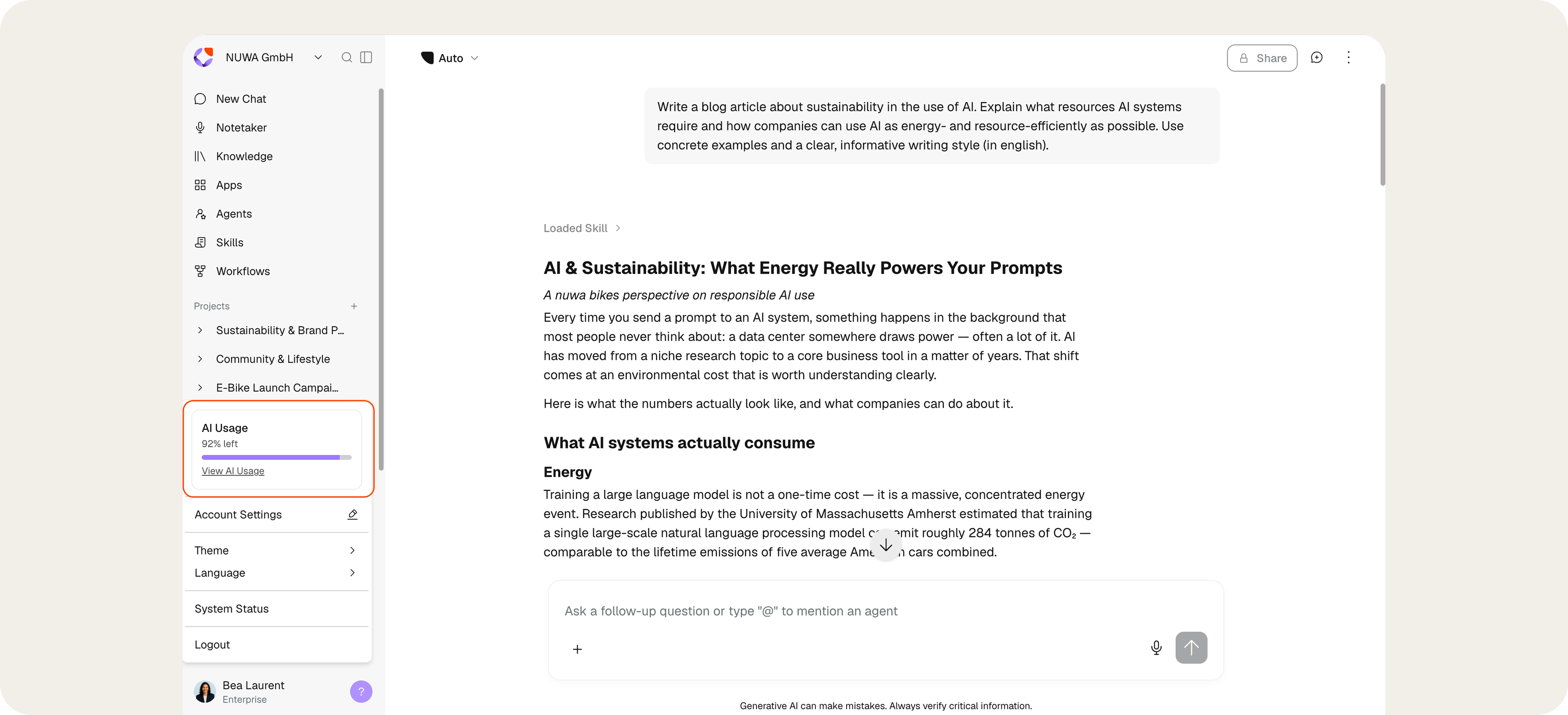
- Plans define the feature scope and provisioning, bookable as Business or Enterprise.
- Seats determine, via the Seat-Type, how much AI usage is included per user, available as Standard, Premium, and Power.
- Additional AI Usage expands the available capacity at the company level and is assigned to individual users as needed.
How AI Usage is structured
AI Usage in Seats
The included AI usage is covered through the Seat. Three Seat-Types are available: Standard, Premium, and Power. The Seat-Types differ only in the amount of included AI usage, not in feature scope: every user receives the same complete feature scope of the respective Plan.Additional AI Usage
When the included AI usage is not sufficient, Additional AI Usage can be booked. It is distributed flexibly across users and suits higher or targeted demand, such as extensive workflows, building apps, or intensive agentic work.Separate Usage Areas
Certain use cases run separately from the internal Seats, in particular external chatbots without an internal user license. Separate rules for Additional AI Usage apply to these areas, agreed upon based on expected usage, model choice, and use case.Seats at a Glance
The Seat-Type determines how much AI usage is included per user and which price per user applies. The following overview shows which Seat-Type suits which users and what AI usage is included. Users who permanently need more AI usage move from the Standard Seat-Type to Premium, or from Premium to Power. The Premium Seat-Type closes the gap for active users who need more AI usage but do not yet require a Power Seat.
Users who permanently need more AI usage move from the Standard Seat-Type to Premium, or from Premium to Power. The Premium Seat-Type closes the gap for active users who need more AI usage but do not yet require a Power Seat.
Managing AI Usage in the Workspace
Admins manage AI usage centrally in the settings under Plan & Usage. This area is accessible to admins only. Plans, Seats, consumption, and Additional AI Usage are brought together there.For Enterprise plans, plan and billing management is handled through the nuwacom Customer Success Manager.
View AI Usage
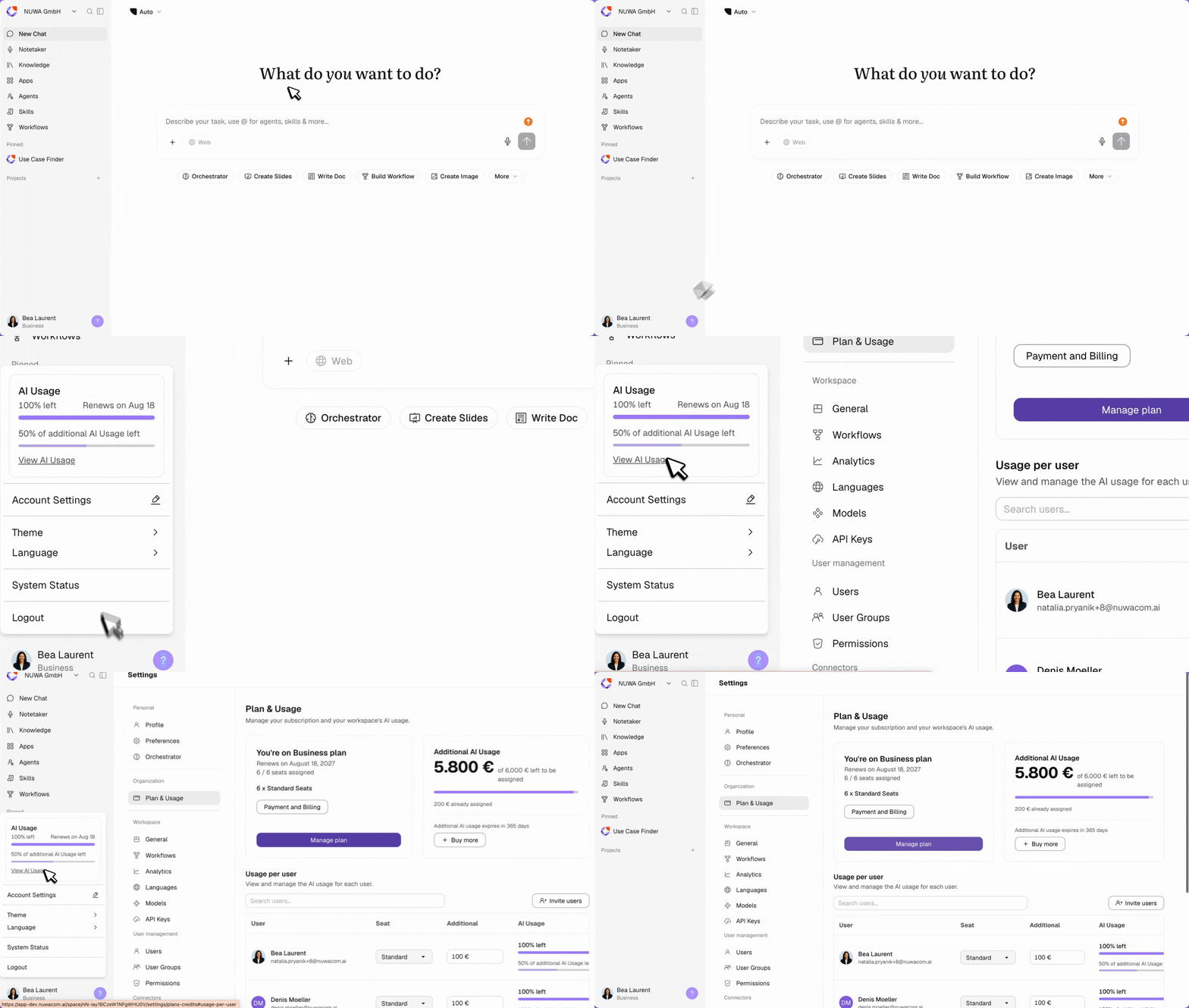
- Click on Account.
- Select View AI Usage.
- Review your teams AI usage.
Review Plan and Included Seats
View the active Plan and renewal date, including the included Seats per Seat-Type: Standard (€25), Premium (€49), Power (€99). Unassigned Seats can be assigned directly through the displayed notice. Plan and billing can be adjusted through Manage Plan and Payment and Billing.Review Consumption in the Workspace
View the consumption of all users at a glance. Track the remaining Additional AI Usage in total and per user as utilization.Assign Seats and Additional AI Usage
For each user, see which Seat-Type is assigned, along with the assigned Additional AI Usage and utilization as a percentage.- Change the seat type in the “Seat” column.
- Swap seat types between two users via the three-dot menu.
- Assign Additional AI Usage from the workspace quota to individual users in the “Additional” column.
- Add more users through “Invite Users” or filter through the search field.
Providing more AI Usage
Two paths increase the available AI usage:1. Upgrade the Seat
Raise a user’s Seat-Type, for example from Standard to Premium or from Premium to Power, when more AI usage is permanently needed.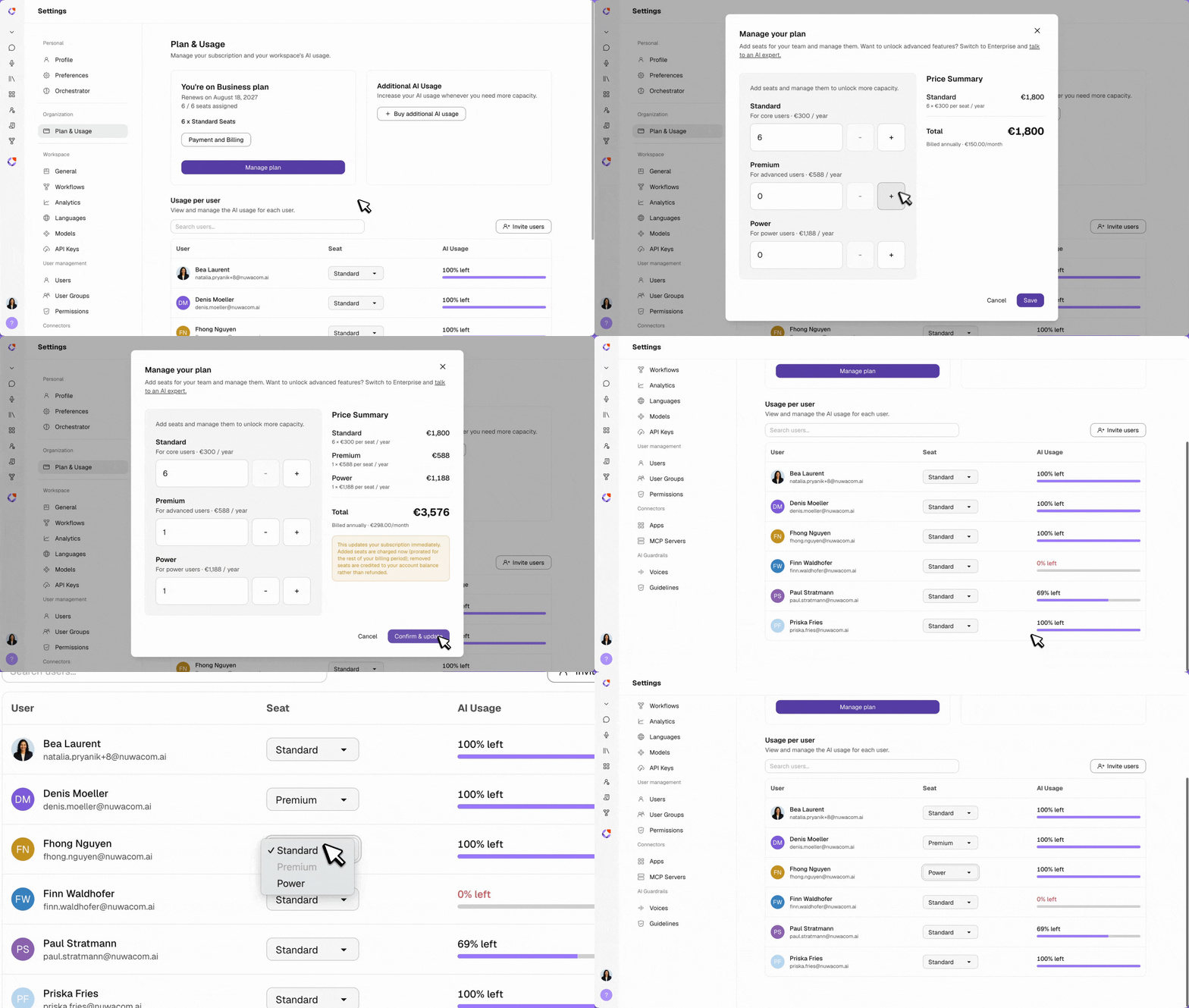
2. Book Additional AI Usage
Rrovide more flexible capacity for users, teams, or use cases.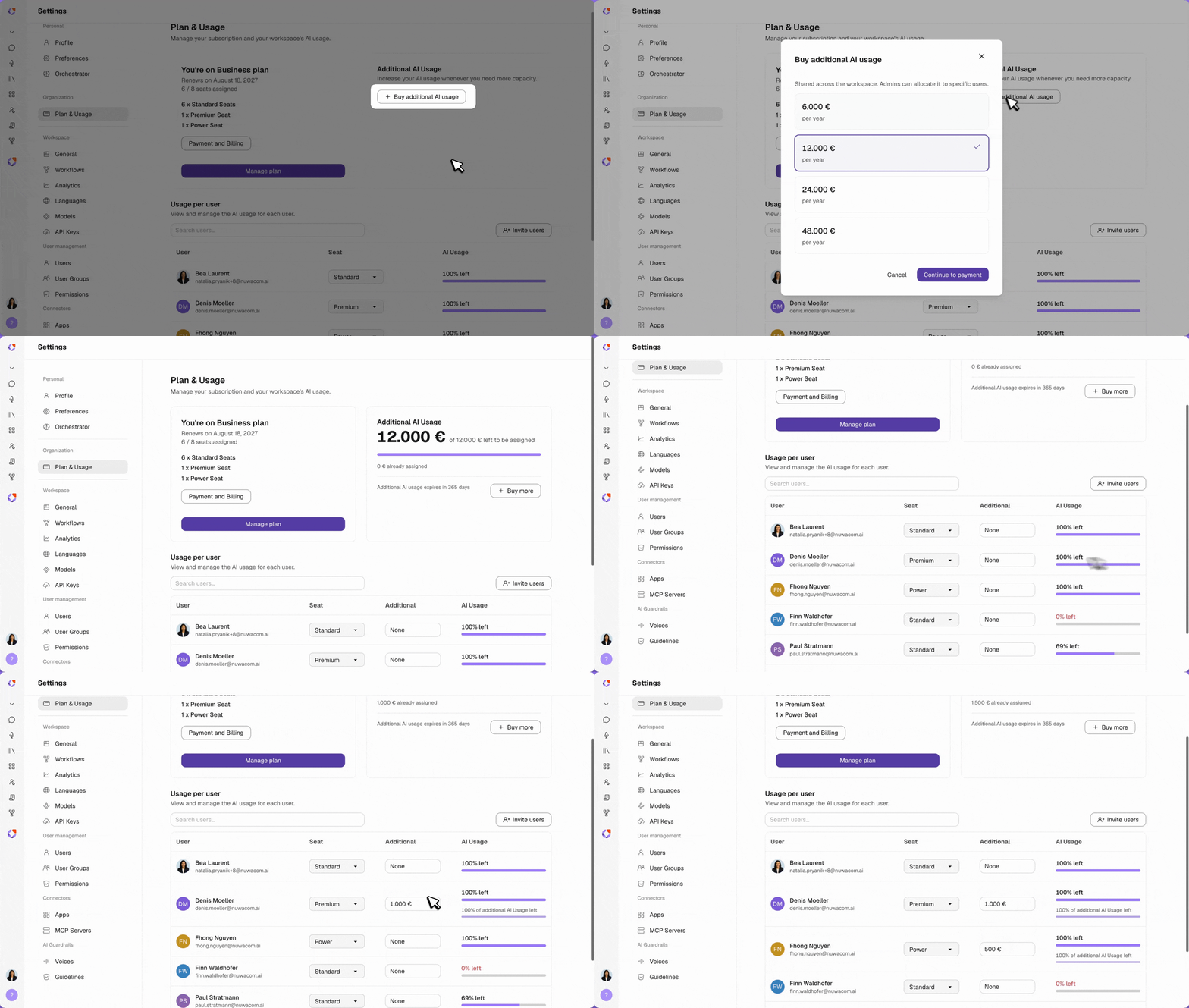
AI Usage Availability Period
Seats
The AI usage included with a Standard, Premium, or Power Seat is available for one month at a time. The full allowance is renewed at the beginning of each month. Unused included AI usage expires at the end of the month and does not carry over to the next month. Each month therefore starts with the full monthly allowance, regardless of how much was used in the previous month.Additional AI Usage
Additional AI Usage is booked as an allowance for the respective contract term. This allowance is available throughout the entire contract term and can be used flexibly during this period. Additional costs only apply if the customer actively books Additional AI Usage or authorizes its purchase.Plans at a Glance
nuwacom is bookable in two Plans. Both include the full AI functionality and differ in provisioning, governance, hosting, and integration depth.
The Enterprise Plan includes all Business features and adds automated Knowledge Base synchronization, advanced governance and compliance, custom integrations, prioritized support with SLA, and dedicated onboarding.
A detailed feature and pricing overview is available here. To unlock advanced features, switch to Enterprise and talk to an AI expert.
What happens when AI Usage is exhausted
Normal Usage in nuwacom
When the monthly included AI usage is used up, nuwacom does not block. Chat remains available. For further requests, the AI model automatically switches to the Auto Mode Instant model, allowing users to continue working without interruption or unplanned additional costs.See the active Instant model under Workspace settings → Models. Auto Mode selects the best model automatically.
External Chatbots and Workflows
When the Additional AI Usage designated for an external chatbot or workflow is exhausted, it is blocked. Further processing resumes only once Additional AI Usage has been booked, a Seat upgrade has taken place, or the next monthly usage period starts.Notifications
Users are automatically notified by email when they reach 80% or 100% of their included AI usage.What consumes more AI Usage
As a guideline: the more context, files, data, and intermediate steps are processed, the more AI usage is consumed. Normal usage, covered through the Seat:- Chat
- Knowledge search
- Summaries
- Meetings
- Simple documents
- Large files
- Complete presentations
- Complex workflows
- Building apps
- Visualizations
- API usage
- External chatbots
- Company-wide automations
AI Usage Tips
Powerful models consume more AI usage, and so do Apps, videos, and images. The greatest impact comes from deliberate use following one principle: think first, then prompt, then run. With Apps, videos, and images in particular, a short preparation step noticeably reduces consumption.- Small context: The biggest driver is usually not the prompt itself, but the conversation history carried along and any attached documents. For a new topic, a new chat works better than a long thread, since every message pulls in the entire prior context. For long files, the relevant excerpt is often enough instead of the whole document.
- Precise over vague prompts: Imprecise requests lead to follow-up questions, wrong assumptions, and rework, and each round costs the full context again. A clear prompt that states context, goal, and desired format saves several clarification rounds.
- Output length control: An explicit request for brevity (“keep it short”, “bullet points only”, “no explanation”) reduces the output and often the follow-up rounds as well.
- No redundancy: Large files or data sets do not need to be re-inserted with every message once they are already in the context. For recurring tasks, a template or a script works better than explaining the full context again.
- Bundled tasks: Several small requests in sequence cost more in total than one structured request that covers everything, since each new message counts the previous history again.
- Only relevant tools and data: Every unnecessarily loaded tool and every unnecessarily searched data source creates additional overhead. A targeted request is more economical than a broad search across all sources.
- Concept work first: For slides or images, develop a script in a simple chat before starting generation. The finished script then serves as a precise prompt instruction and saves AI usage, because the AI has less room for interpretation and delivers the result on the first attempt.
FAQ
Which Plans and Seats are available?
Which Plans and Seats are available?
Available are the Business Plan from €25 per user and month in self-serve, and the Enterprise Plan from 20 users with individual consultation. Within both Plans, the Seat-Types Standard (1x), Premium (2x), and Power (5x) are available.
Are there feature-scope restrictions depending on Seat-Type or booked AI usage?
Are there feature-scope restrictions depending on Seat-Type or booked AI usage?
No. Seat-Types and Additional AI Usage differ only in the amount of included AI usage, not in feature scope. A higher Seat-Type or Additional AI Usage only expands the usage volume and does not unlock additional features.
Do additional costs arise automatically with high usage?
Do additional costs arise automatically with high usage?
No. Additional costs arise only when Additional AI Usage is deliberately booked or approved.
Is nuwacom blocked when AI usage is exhausted?
Is nuwacom blocked when AI usage is exhausted?
No. Chat automatically switches to Auto Mode on a more cost-efficient model. Only external chatbots and workflows are blocked once their Additional AI Usage is exhausted.
How is the AI usage of workflows billed?
How is the AI usage of workflows billed?
A workflow always runs on behalf of a specific user and consumes that user’s included or additionally booked AI usage, including automatic or recurring runs. For regular, complex, or company-wide automations, Additional AI Usage is recommended.
Does uploading data to the Knowledge Base consume AI usage?
Does uploading data to the Knowledge Base consume AI usage?
No. The manual upload consumes no AI usage. It arises only with AI actions on the data, such as search, summary, analysis, chat over knowledge, or app and workflow execution.
Does the included AI usage renew monthly, and does unused usage carry over?
Does the included AI usage renew monthly, and does unused usage carry over?
The included AI usage renews fully at the beginning of each month. Unused usage does not carry over. Additional AI Usage, in contrast, does not expire at the end of the month but remains usable throughout the contract term.