> ## Documentation Index
> Fetch the complete documentation index at: https://docs.nuwacom.ai/llms.txt
> Use this file to discover all available pages before exploring further.
# User management
> Invite users and manage their access rights on the platform
Effective user management ensures that all team members receive the appropriate access rights and can use the platform efficiently and securely. By assigning permissions precisely, you protect sensitive data and ensure compliance with data protection regulations.
Only admins and superadmins have access to user management.
***
## **Invite and manage users**
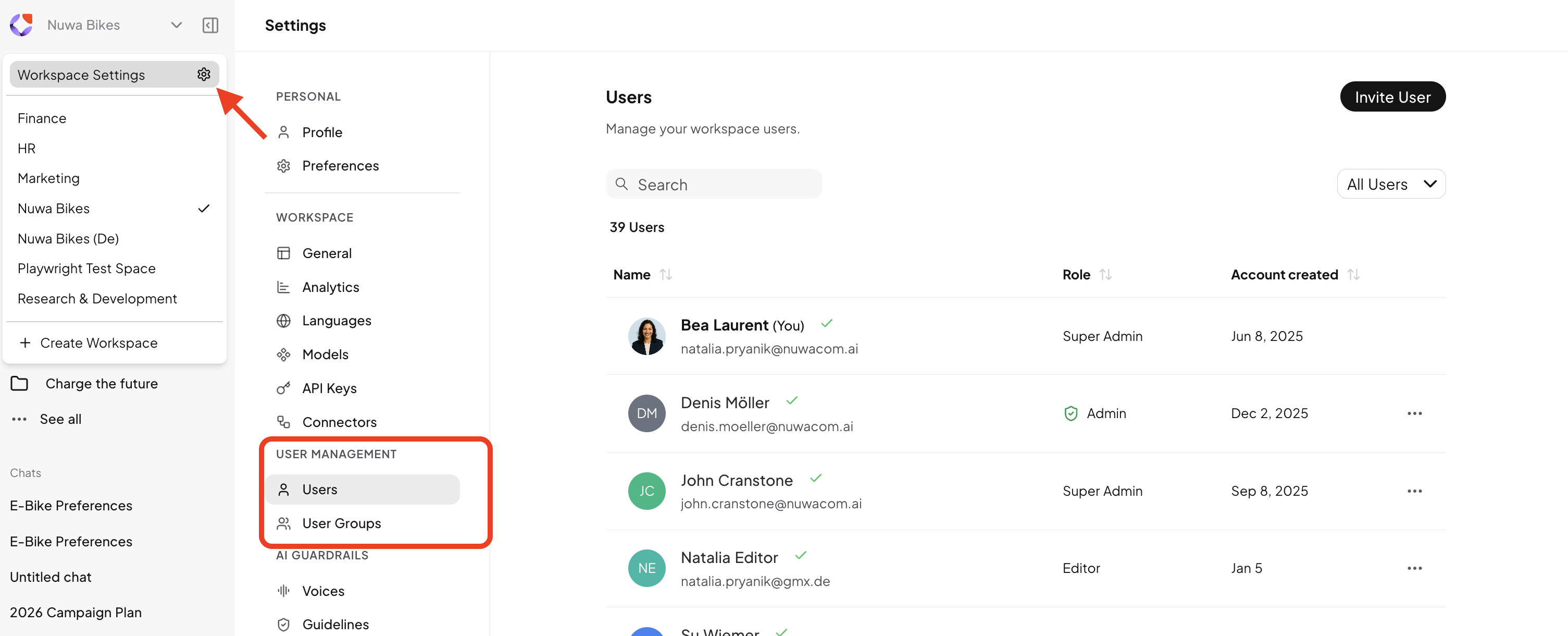 In the workspace settings, open the "Users" section to manage your workspace members:
* **Invite Users:** Add new team members by email invitation.
* **Invitation Status:** See whether a user has accepted the invitation. If not, you can resend the email or remove the user.
* **Assign Roles and Permissions:** Each user is assigned a specific role with corresponding permissions, determining their access to features and data in the nuwacom platform. Your rights depend on the role assigned to you – such as Admin, Editor, or Viewer.
Note: Users must be invited to each workspace individually.
***
## **User Groups**
In the workspace settings, open the "Users" section to manage your workspace members:
* **Invite Users:** Add new team members by email invitation.
* **Invitation Status:** See whether a user has accepted the invitation. If not, you can resend the email or remove the user.
* **Assign Roles and Permissions:** Each user is assigned a specific role with corresponding permissions, determining their access to features and data in the nuwacom platform. Your rights depend on the role assigned to you – such as Admin, Editor, or Viewer.
Note: Users must be invited to each workspace individually.
***
## **User Groups**
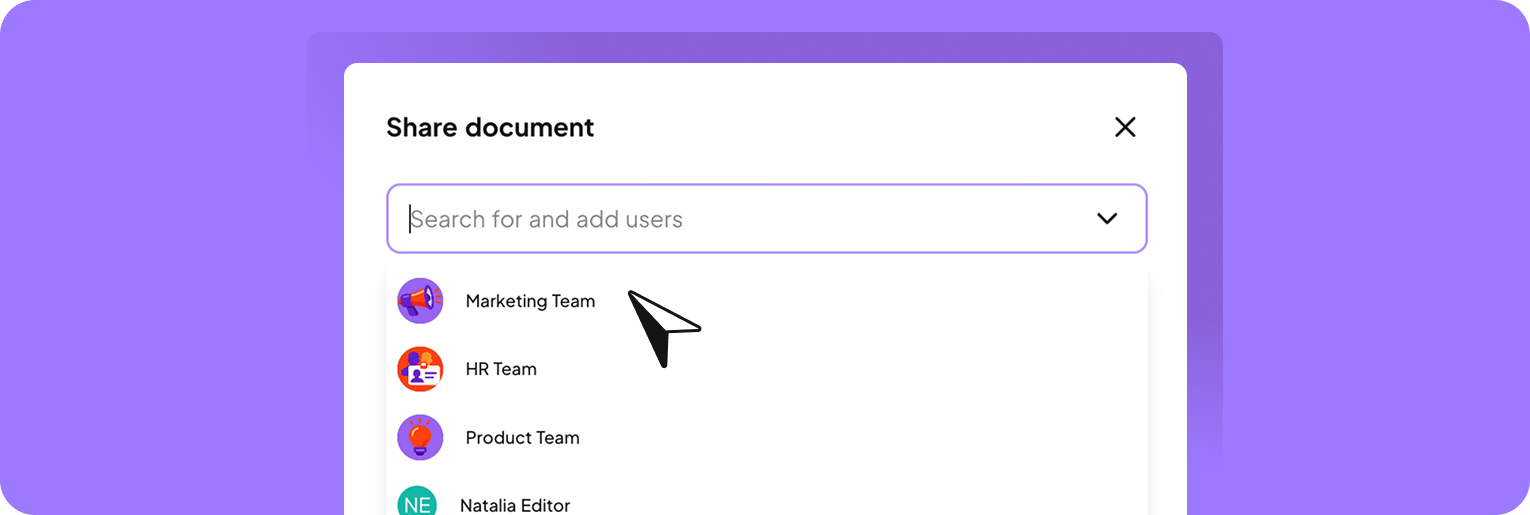 With user groups, you can easily share items with entire teams. Instead of selecting individual users each time you share something, you bundle people into groups and use these groups when sharing chats, documents, projects, agents, and more. Only members of the selected group receive access to the respective item.
**Your benefits at a glance**
* Share content with a single user group instead of individual users.
* Complete recurring sharing tasks in seconds.
* Update the group once and automatically adjust access everywhere.
**Example:**\
Share a knowledge folder by selecting the user group “Marketing Team” with the permission *Edit* in the sharing dialog. All members of this group will receive editing access to the folder. Other members of the workspace will not have access.
**How it works**
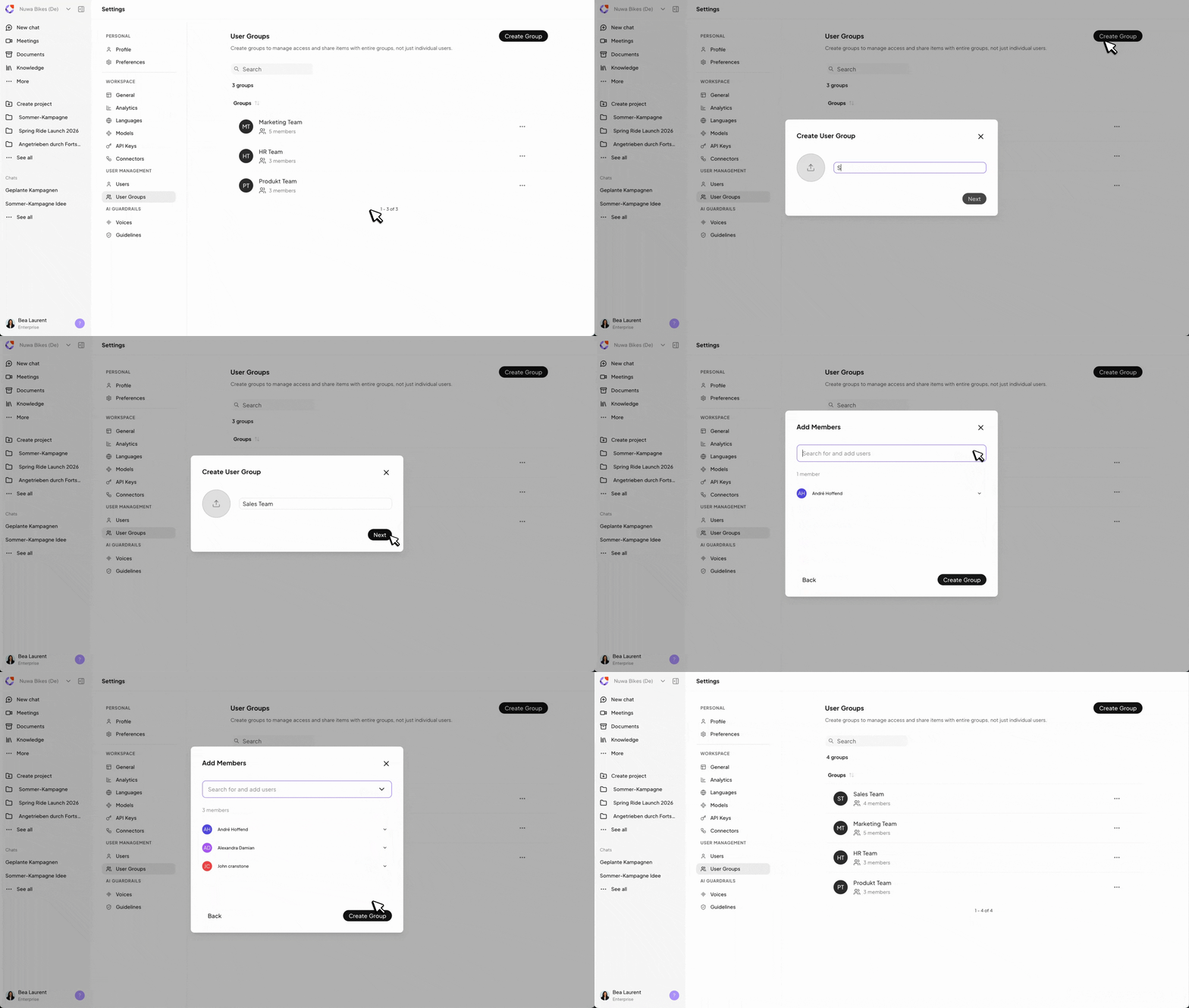
1. Open the workspace settings.
2. In the left menu, navigate to *User Management → User Groups.*
3. Click *Create group* in the top right.
4. Enter a name for the user group.
5. Optional: Upload an icon or avatar for the group.
6. Click *Next.*
7. Add users via search with a click.
8. Click *Create group* to create the group.
**Result:** The user group is now created and ready to be used for sharing chats, documents, projects, knowledge folders and more.
With user groups, you can easily share items with entire teams. Instead of selecting individual users each time you share something, you bundle people into groups and use these groups when sharing chats, documents, projects, agents, and more. Only members of the selected group receive access to the respective item.
**Your benefits at a glance**
* Share content with a single user group instead of individual users.
* Complete recurring sharing tasks in seconds.
* Update the group once and automatically adjust access everywhere.
**Example:**\
Share a knowledge folder by selecting the user group “Marketing Team” with the permission *Edit* in the sharing dialog. All members of this group will receive editing access to the folder. Other members of the workspace will not have access.
**How it works**
1. Open the workspace settings.
2. In the left menu, navigate to *User Management → User Groups.*
3. Click *Create group* in the top right.
4. Enter a name for the user group.
5. Optional: Upload an icon or avatar for the group.
6. Click *Next.*
7. Add users via search with a click.
8. Click *Create group* to create the group.
**Result:** The user group is now created and ready to be used for sharing chats, documents, projects, knowledge folders and more.
 **FAQ**
User groups can be created and managed by admins and super admins.
Yes. Admins can see all user groups in the workspace, regardless of their own membership.
You see a user group if you are a member of that group or if you have admin rights.
Yes. The creator of a group is automatically added as a member.
When sharing an item, you can assign read or edit permissions, just as you would for individual users. These permissions apply to all members of the selected group.
* **Read:** View content, but not edit it.
* **Edit:** View, edit, or delete content.
* **Remove access:** Revoke sharing at any time.
New members automatically gain access to all items shared with the group. Removed members lose access accordingly.
***
## **Roles and Permissions**
The table gives you an overview of the roles and their respective access rights within the AI platform. Each role has specific permissions that regulate your access to certain features and data.
The table shows the default permissions for each role. For Editors and Readers, these can be customized individually per workspace, and specific features can be activated or deactivated as needed.
| **Feature** | **Action** | **Reader** | **Editor** | **Admin** |
| :------------------------------- | :------------------------- | :--------- | :--------- | :-------- |
| **Chat** | Read | ✓ | ✓ | ✓ |
| | Create / Update | ✓ | ✓ | ✓ |
| | Delete | ✓ | ✓ | ✓ |
| **Chat Documents** | Read | ✓ | ✓ | ✓ |
| | Create / Update | ✓ | ✓ | ✓ |
| | Delete | ✓ | ✓ | ✓ |
| **Search** | Read | ✓ | ✓ | ✓ |
| | Create Content | | ✓ | ✓ |
| | Start Chat | ✓ | ✓ | ✓ |
| **Project** | Read | ✓ | ✓ | ✓ |
| | Create / Update | | ✓ | ✓ |
| | Delete | | ✓ | ✓ |
| **Document** | Read | ✓ | ✓ | ✓ |
| | Create / Update | | ✓ | ✓ |
| | Delete | | ✓ | ✓ |
| **Meeting** | Read | ✓ | ✓ | ✓ |
| | Create / Update | | ✓ | ✓ |
| | Delete | | ✓ | ✓ |
| **Agents** | Read | ✓ | ✓ | ✓ |
| | Create / Update | | ✓ | ✓ |
| | Delete | | ✓ | ✓ |
| | Share | | ✓ | ✓ |
| **Skills** | Read | ✓ | ✓ | ✓ |
| | Create / Update | | ✓ | ✓ |
| | Delete | | ✓ | ✓ |
| | Share | | ✓ | ✓ |
| **Prompts** | Read | ✓ | ✓ | ✓ |
| | Create / Update | | ✓ | ✓ |
| | Share | | ✓ | ✓ |
| | Delete | | ✓ | ✓ |
| **Tags** | Read | ✓ | ✓ | ✓ |
| | Create / Update | | ✓ | ✓ |
| | Delete | | ✓ | ✓ |
| **Workflows** | Read | ✓ | ✓ | ✓ |
| | Create / Update | | ✓ | ✓ |
| | Delete | | ✓ | ✓ |
| **Knowledge-Base Assets** | Read | ✓ | ✓ | ✓ |
| | Create / Update | | ✓ | ✓ |
| | Delete | | ✓ | ✓ |
| **Knowledge Sync** | Read | ✓ | ✓ | ✓ |
| | Sync to Agents or Projects | | ✓ | ✓ |
| | Sync from Connectors | | | ✓ |
| **User Groups** | Read | | | ✓ |
| | Create / Update | | | ✓ |
| | Delete | | | ✓ |
| **Workspace Documents** | Read | ✓ | ✓ | ✓ |
| | Create / Update | | ✓ | ✓ |
| | Delete | | ✓ | ✓ |
| **User Management** | Read | | | ✓ |
| | Create / Update | | | ✓ |
| | Delete | | | ✓ |
| **Language Management** | Read | | | ✓ |
| | Configure | | | ✓ |
| **Model Settings** | Read | | | ✓ |
| | Configure | | | ✓ |
| **Analytics** | View | | | ✓ |
| | Configure | | | ✓ |
| **API Keys** | Read | | | ✓ |
| | Create / Update | | | ✓ |
| | Delete | | | ✓ |
| **Apps** | Read | | | ✓ |
| | Create / Update | | | ✓ |
| | Delete | | | ✓ |
| **Connectors (MCP/Credentials)** | Read | | | ✓ |
| | Create / Update | | | ✓ |
| | Delete | | | ✓ |
| **Workspace** | Read | ✓ | ✓ | ✓ |
| | Create / Update | | | ✓ |
| | Delete | | | ✓ |
***
## **Manage Permissions**
**FAQ**
User groups can be created and managed by admins and super admins.
Yes. Admins can see all user groups in the workspace, regardless of their own membership.
You see a user group if you are a member of that group or if you have admin rights.
Yes. The creator of a group is automatically added as a member.
When sharing an item, you can assign read or edit permissions, just as you would for individual users. These permissions apply to all members of the selected group.
* **Read:** View content, but not edit it.
* **Edit:** View, edit, or delete content.
* **Remove access:** Revoke sharing at any time.
New members automatically gain access to all items shared with the group. Removed members lose access accordingly.
***
## **Roles and Permissions**
The table gives you an overview of the roles and their respective access rights within the AI platform. Each role has specific permissions that regulate your access to certain features and data.
The table shows the default permissions for each role. For Editors and Readers, these can be customized individually per workspace, and specific features can be activated or deactivated as needed.
| **Feature** | **Action** | **Reader** | **Editor** | **Admin** |
| :------------------------------- | :------------------------- | :--------- | :--------- | :-------- |
| **Chat** | Read | ✓ | ✓ | ✓ |
| | Create / Update | ✓ | ✓ | ✓ |
| | Delete | ✓ | ✓ | ✓ |
| **Chat Documents** | Read | ✓ | ✓ | ✓ |
| | Create / Update | ✓ | ✓ | ✓ |
| | Delete | ✓ | ✓ | ✓ |
| **Search** | Read | ✓ | ✓ | ✓ |
| | Create Content | | ✓ | ✓ |
| | Start Chat | ✓ | ✓ | ✓ |
| **Project** | Read | ✓ | ✓ | ✓ |
| | Create / Update | | ✓ | ✓ |
| | Delete | | ✓ | ✓ |
| **Document** | Read | ✓ | ✓ | ✓ |
| | Create / Update | | ✓ | ✓ |
| | Delete | | ✓ | ✓ |
| **Meeting** | Read | ✓ | ✓ | ✓ |
| | Create / Update | | ✓ | ✓ |
| | Delete | | ✓ | ✓ |
| **Agents** | Read | ✓ | ✓ | ✓ |
| | Create / Update | | ✓ | ✓ |
| | Delete | | ✓ | ✓ |
| | Share | | ✓ | ✓ |
| **Skills** | Read | ✓ | ✓ | ✓ |
| | Create / Update | | ✓ | ✓ |
| | Delete | | ✓ | ✓ |
| | Share | | ✓ | ✓ |
| **Prompts** | Read | ✓ | ✓ | ✓ |
| | Create / Update | | ✓ | ✓ |
| | Share | | ✓ | ✓ |
| | Delete | | ✓ | ✓ |
| **Tags** | Read | ✓ | ✓ | ✓ |
| | Create / Update | | ✓ | ✓ |
| | Delete | | ✓ | ✓ |
| **Workflows** | Read | ✓ | ✓ | ✓ |
| | Create / Update | | ✓ | ✓ |
| | Delete | | ✓ | ✓ |
| **Knowledge-Base Assets** | Read | ✓ | ✓ | ✓ |
| | Create / Update | | ✓ | ✓ |
| | Delete | | ✓ | ✓ |
| **Knowledge Sync** | Read | ✓ | ✓ | ✓ |
| | Sync to Agents or Projects | | ✓ | ✓ |
| | Sync from Connectors | | | ✓ |
| **User Groups** | Read | | | ✓ |
| | Create / Update | | | ✓ |
| | Delete | | | ✓ |
| **Workspace Documents** | Read | ✓ | ✓ | ✓ |
| | Create / Update | | ✓ | ✓ |
| | Delete | | ✓ | ✓ |
| **User Management** | Read | | | ✓ |
| | Create / Update | | | ✓ |
| | Delete | | | ✓ |
| **Language Management** | Read | | | ✓ |
| | Configure | | | ✓ |
| **Model Settings** | Read | | | ✓ |
| | Configure | | | ✓ |
| **Analytics** | View | | | ✓ |
| | Configure | | | ✓ |
| **API Keys** | Read | | | ✓ |
| | Create / Update | | | ✓ |
| | Delete | | | ✓ |
| **Apps** | Read | | | ✓ |
| | Create / Update | | | ✓ |
| | Delete | | | ✓ |
| **Connectors (MCP/Credentials)** | Read | | | ✓ |
| | Create / Update | | | ✓ |
| | Delete | | | ✓ |
| **Workspace** | Read | ✓ | ✓ | ✓ |
| | Create / Update | | | ✓ |
| | Delete | | | ✓ |
***
## **Manage Permissions**
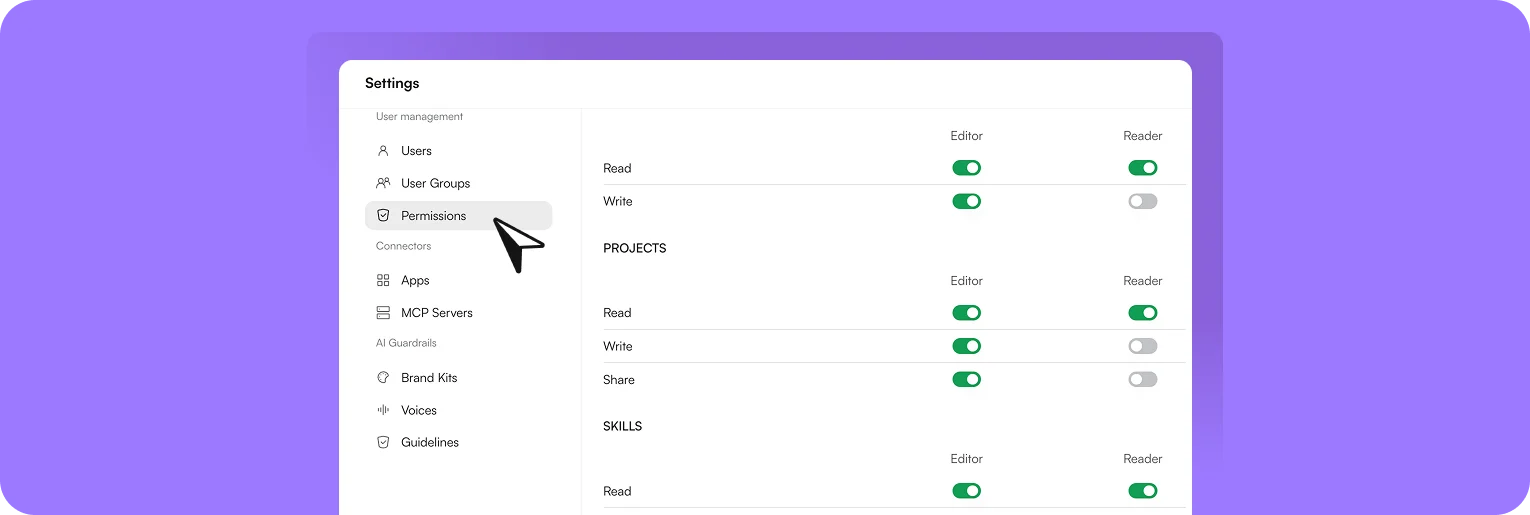 As an Admin, you can use the permissions matrix to define which workspace features are available to Editors and Readers. Permissions can be activated or deactivated for each feature, for example for Agents, Workflows, Projects, Skills, or Prompts.
This lets you control which roles can view, use, edit, or share specific areas.
You can find the permissions under **Workspace Settings > User Management > Permissions**. Depending on the feature, different permissions are available, for example:
| Permission | Meaning |
| :--------- | :--------------------------------------------- |
| Read | The feature or content can be viewed and used. |
| Write | Content can be created or edited. |
| Share | Content can be shared with other people. |
Admins always retain full access and cannot be restricted.
### Adjust permissions
Activate or deactivate the desired permissions using the switches in the matrix. Then click ‘Save changes’ so that the adjustments are applied and take effect for the affected users.
### What happens when access is restricted?
If a role does not have access to a feature, that feature is not displayed for the affected users or cannot be used. If a restricted feature is opened directly via a link, an access restriction is shown.
As an Admin, you can use the permissions matrix to define which workspace features are available to Editors and Readers. Permissions can be activated or deactivated for each feature, for example for Agents, Workflows, Projects, Skills, or Prompts.
This lets you control which roles can view, use, edit, or share specific areas.
You can find the permissions under **Workspace Settings > User Management > Permissions**. Depending on the feature, different permissions are available, for example:
| Permission | Meaning |
| :--------- | :--------------------------------------------- |
| Read | The feature or content can be viewed and used. |
| Write | Content can be created or edited. |
| Share | Content can be shared with other people. |
Admins always retain full access and cannot be restricted.
### Adjust permissions
Activate or deactivate the desired permissions using the switches in the matrix. Then click ‘Save changes’ so that the adjustments are applied and take effect for the affected users.
### What happens when access is restricted?
If a role does not have access to a feature, that feature is not displayed for the affected users or cannot be used. If a restricted feature is opened directly via a link, an access restriction is shown.