> ## Documentation Index
> Fetch the complete documentation index at: https://docs.nuwacom.ai/llms.txt
> Use this file to discover all available pages before exploring further.
# Identifying Use Cases
This guide helps you recognize meaningful AI use cases in your company and implement them successfully.
### What makes a good AI use case?
Strong use cases are situations where AI agents or workflows improve the quality of your work or product and/or reduce effort and time to results.
**Tip:** Start with horizontal use cases—those relevant across teams. They offer several advantages:
1. **Shared understanding:** Acceptance increases when everyone can relate to the problem.
2. **Less customization:** Horizontal use cases typically require fewer individual adjustments.
3. **Faster start:** Highly specialized use cases demand more know-how. Begin with simple, scalable solutions to build experience.
**Examples:** Email assistant, document summarization, translations—practical in almost every organization and significantly easing everyday work.
***
## How to find suitable use cases
### **1. Experiment & understand AI capabilities**
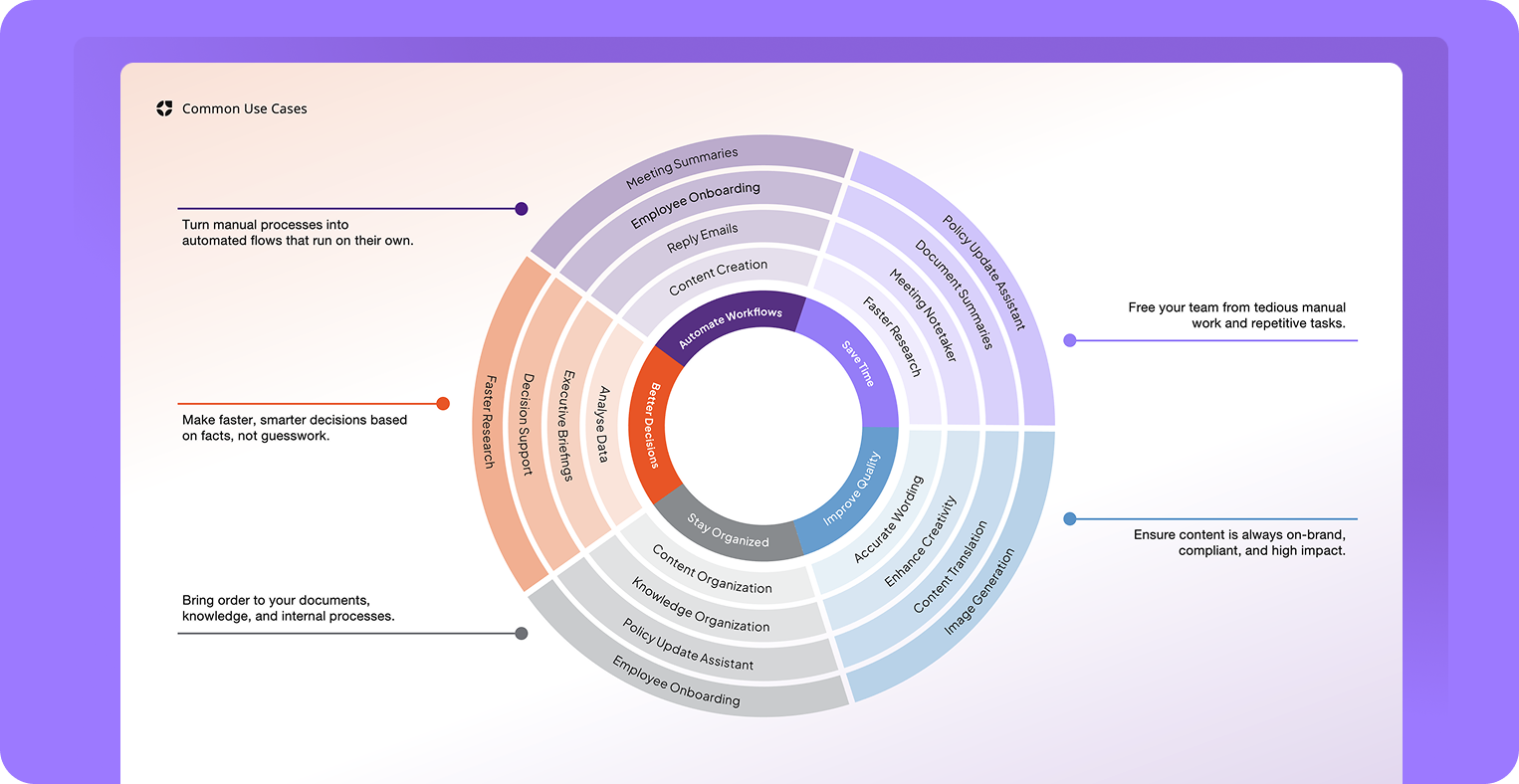 \
Let users experiment with AI and showcase concrete examples. New ideas for agents and workflows will emerge organically.
**Typical AI capabilities:**
| **Text** | **Images** | **Audio (coming soon)** | **Data Analysis** |
| :--------------- | :----------- | :---------------------- | :-------------------------------- |
| Write | Create | Transcribe | Extract data |
| Summarize | Analyze | Speak | Perform analyses and calculations |
| Analyze | Describe | | Identify patterns |
| Answer questions | Extract text | | Create tables and diagrams |
### **2. List daily task**
Ask users to write down 5 recurring, time-consuming tasks from their workday.
### **3. Collect & cluster tasks**
Gather tasks in a team session and group similar activities. Overlaps are opportunities for shared solutions.
Tip: Use digital whiteboards (e.g., Miro, Mural, FigJam) for idea collection.
### **4. Match tasks with AI capabilities**
Link the collected tasks to the right AI capabilities. Example: translations require text generation, summaries require text analysis and compression.
### **5. Prioritize: What to implement first?**
\
Let users experiment with AI and showcase concrete examples. New ideas for agents and workflows will emerge organically.
**Typical AI capabilities:**
| **Text** | **Images** | **Audio (coming soon)** | **Data Analysis** |
| :--------------- | :----------- | :---------------------- | :-------------------------------- |
| Write | Create | Transcribe | Extract data |
| Summarize | Analyze | Speak | Perform analyses and calculations |
| Analyze | Describe | | Identify patterns |
| Answer questions | Extract text | | Create tables and diagrams |
### **2. List daily task**
Ask users to write down 5 recurring, time-consuming tasks from their workday.
### **3. Collect & cluster tasks**
Gather tasks in a team session and group similar activities. Overlaps are opportunities for shared solutions.
Tip: Use digital whiteboards (e.g., Miro, Mural, FigJam) for idea collection.
### **4. Match tasks with AI capabilities**
Link the collected tasks to the right AI capabilities. Example: translations require text generation, summaries require text analysis and compression.
### **5. Prioritize: What to implement first?**
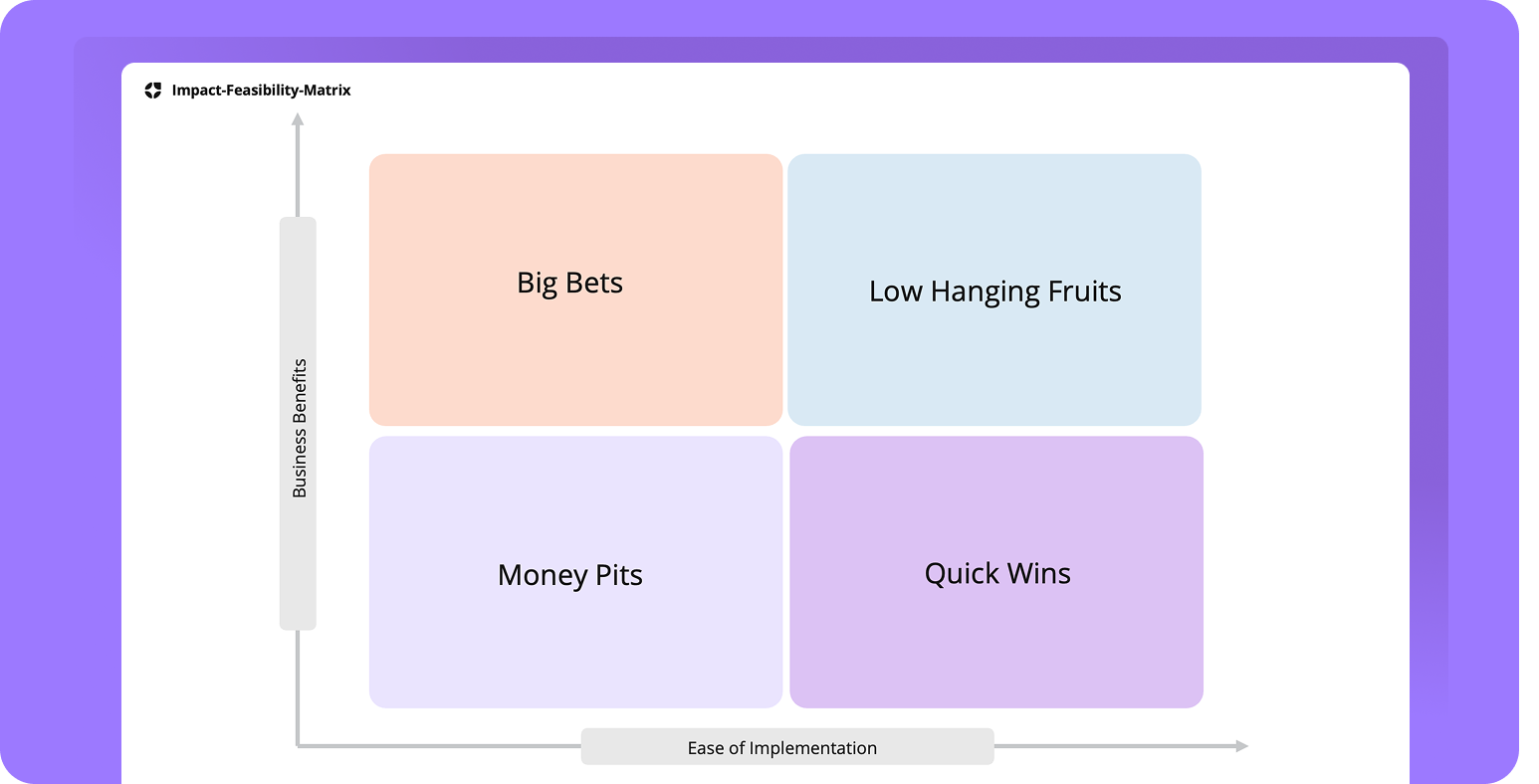 Don’t try everything at once. Focus on a few impactful use cases. A proven approach is using a 2x2 matrix with Feasibility and Impact:
**Feasibility:**
* **Effort:** Low effort = faster implementation
* **Data availability:** Are the necessary data available and usable?
* **Integrations:** Do interfaces or APIs need to be connected?
**Impact:**
* **Time savings:** How many hours can be saved?
* **Quality improvement:** Will the result be better, more accurate?
* **Customer satisfaction:** Will service quality improve?
* **Financial effect:** Can costs be reduced or revenue increased?
**Start with low-effort, high-impact use cases.**
### **6. Document & implement**
Record results in a table listing all use cases, required AI capabilities, effort, impact, owners, and next steps.
Here’s the extracted text from the table, translated into English:
| ID | Opportunity / Problem | Solution Space | Use Case Title | Value | Ease |
| :- | :----------------------------------- | :---------------------- | :------------------------------------- | :---- | :--- |
| 01 | High time effort for FAQ maintenance | Knowledge Search & Chat | FAQ Auto-Updater | 4 | 3 |
| 02 | Long response times in support | Text automation | Response Generator for Support Tickets | 5 | 4 |
| 03 | Time-consuming market trend research | Research automation | AI-powered Trend Summary | 3 | 2 |
### **7. Build use cases together**
Implement first cases as a team to build familiarity. Afterwards, let users work independently or in small groups. 1–2 weeks is ideal for first experiments.
**Follow-up:** Support users, gather feedback, and share best practices in team meetings.
**Important:** Not every use case works perfectly right away—this is part of the learning process. Stay open to adjustments.
## Summary
With [nuwacom](http://nuwacom.ai), you create the foundation for productive, secure, and scalable AI adoption by identifying use cases that deliver real value and can be implemented with ease.
Don’t try everything at once. Focus on a few impactful use cases. A proven approach is using a 2x2 matrix with Feasibility and Impact:
**Feasibility:**
* **Effort:** Low effort = faster implementation
* **Data availability:** Are the necessary data available and usable?
* **Integrations:** Do interfaces or APIs need to be connected?
**Impact:**
* **Time savings:** How many hours can be saved?
* **Quality improvement:** Will the result be better, more accurate?
* **Customer satisfaction:** Will service quality improve?
* **Financial effect:** Can costs be reduced or revenue increased?
**Start with low-effort, high-impact use cases.**
### **6. Document & implement**
Record results in a table listing all use cases, required AI capabilities, effort, impact, owners, and next steps.
Here’s the extracted text from the table, translated into English:
| ID | Opportunity / Problem | Solution Space | Use Case Title | Value | Ease |
| :- | :----------------------------------- | :---------------------- | :------------------------------------- | :---- | :--- |
| 01 | High time effort for FAQ maintenance | Knowledge Search & Chat | FAQ Auto-Updater | 4 | 3 |
| 02 | Long response times in support | Text automation | Response Generator for Support Tickets | 5 | 4 |
| 03 | Time-consuming market trend research | Research automation | AI-powered Trend Summary | 3 | 2 |
### **7. Build use cases together**
Implement first cases as a team to build familiarity. Afterwards, let users work independently or in small groups. 1–2 weeks is ideal for first experiments.
**Follow-up:** Support users, gather feedback, and share best practices in team meetings.
**Important:** Not every use case works perfectly right away—this is part of the learning process. Stay open to adjustments.
## Summary
With [nuwacom](http://nuwacom.ai), you create the foundation for productive, secure, and scalable AI adoption by identifying use cases that deliver real value and can be implemented with ease.